Subsidy hero
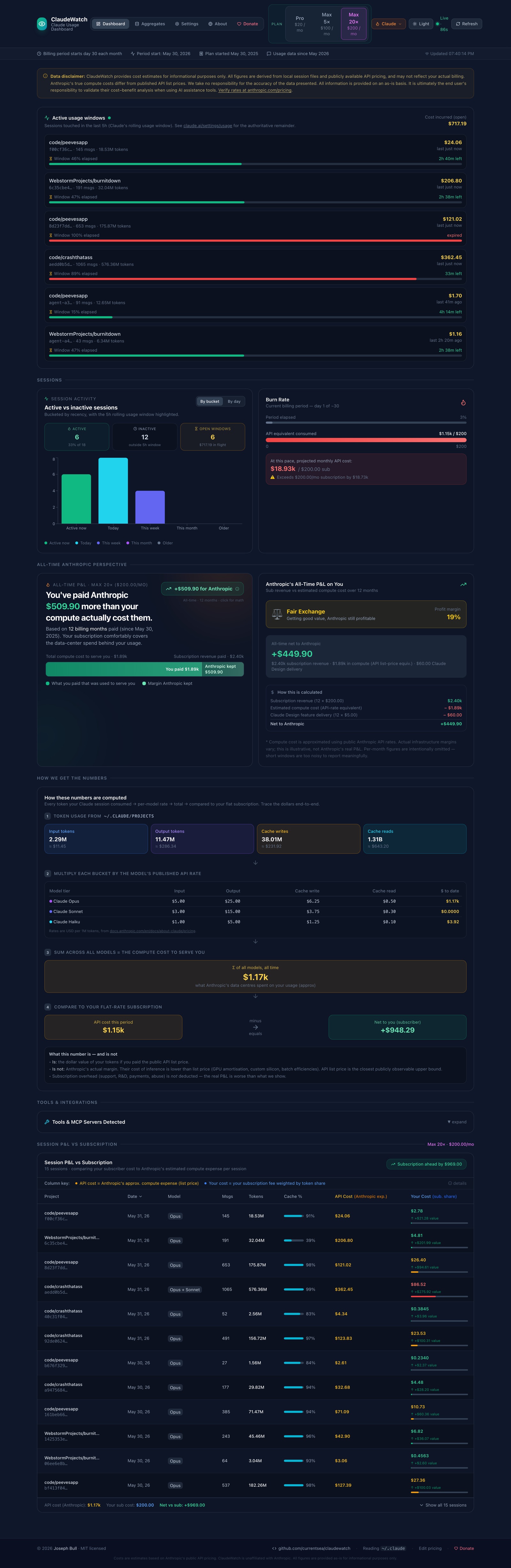
One sentence — is Anthropic eating money to serve you, or making a margin? — with a split bar showing what you paid vs what they ate.
Projects BurnItDown
🔥 Open source · MIT · 100% local · Real-time
A local, real-time dashboard that reads your Claude Code session files
(~/.claude/projects/**/*.jsonl), prices every token at Anthropic's public
API rates, and compares that against the flat subscription you actually pay. Nothing
leaves your machine.
How much of Anthropic's spend on your usage is subsidized by their subscription pricing — versus how much you're actually paying for?
See it working
These are real captures from a live run against actual Claude Code session data. The dashboard refreshes on a polling interval (90s by default) so spend updates in near real time.
localStorage and apply on the next refresh.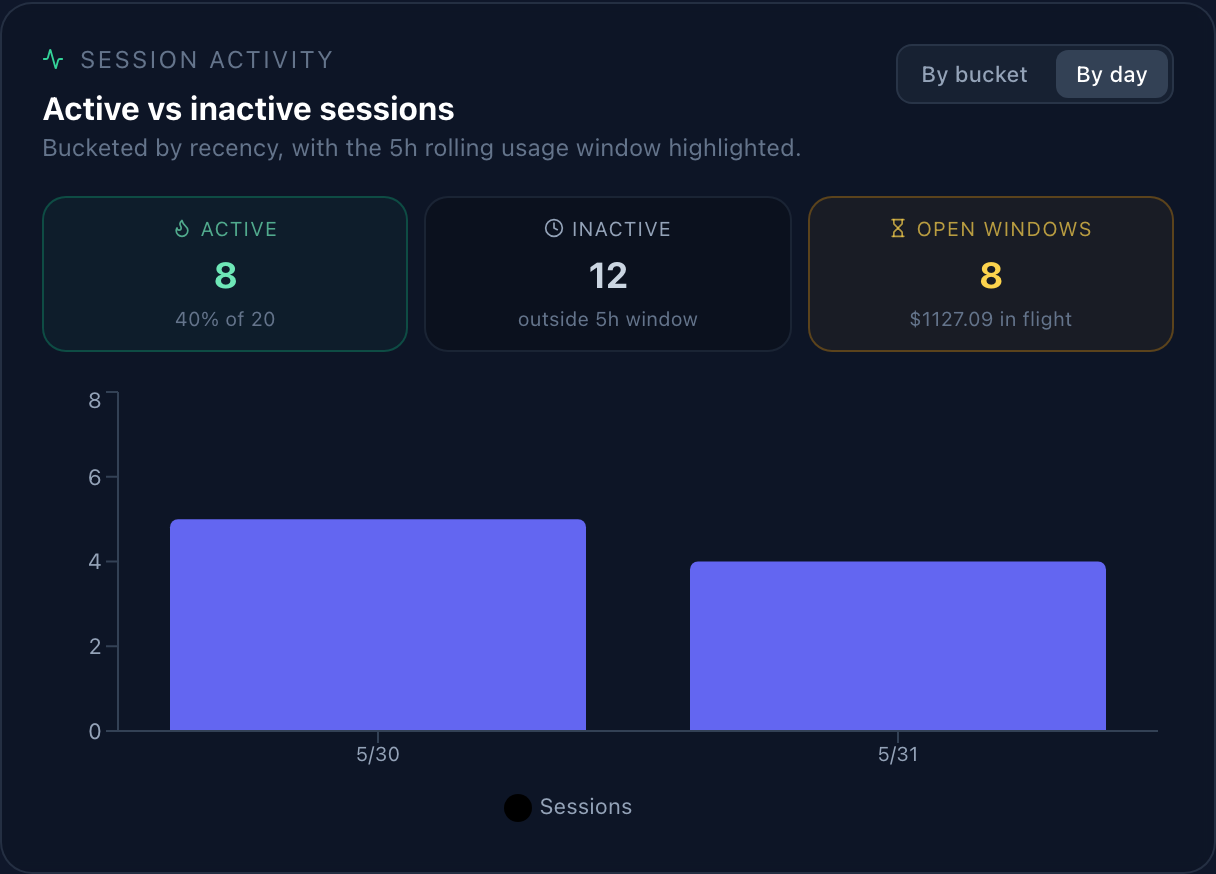
Getting started
BurnItDown is fully ready to run — no account, no API key, no cloud. If you've used Claude Code at least once, you already have the data it reads.
| Requirement | Version / note |
|---|---|
| Node.js | 18 or newer |
| npm | 9 or newer |
| Claude Code CLI | installed and used at least once (so ~/.claude exists) |
# 1. Clone the repo
git clone https://github.com/currentsea/claudewatch.git
cd claudewatch

# 2. Install dependencies
npm install

# 3. (optional) point at a non-default data dir, change billing day, etc.
cp .env.example .env

# 4. Run — starts BOTH the API and the React dashboard
npm start
npm start launches two processes together: the backend API at
http://localhost:3001 (reads ~/.claude and serves aggregated JSON)
and the frontend at http://localhost:3005, which opens
automatically in your browser. You should see the dashboard populate within a second or two.
npm run server   # API only       → http://localhost:3001
npm run client # dashboard only → http://localhost:3005http://localhost:3005 and confirm the “Live · 90s” badge in the header is pulsing green.What you get
One sentence — is Anthropic eating money to serve you, or making a margin? — with a split bar showing what you paid vs what they ate.
All-time API-equivalent cost, this-period cost vs subscription, net value, and Anthropic's all-time P&L on you.
Where you are in your billing period — current spend, projected month-end spend, and whether you'll exceed your subscription.
Sessions touched in Claude's rolling 5-hour window, with incurred cost and time remaining until the window closes.
A step-by-step visualization of how raw tokens become dollars become P&L — so you can trust the numbers.
Click any session for the full message timeline, per-model token breakdown, working directory, and git branch.
Under the hood
For every assistant message, the server reads the usage block and applies the
configured API rate for that model's tier:
cost = (input_tokens          × input_rate       / 1,000,000)
     + (output_tokens         × output_rate      / 1,000,000)
     + (cache_creation_tokens × cache_write_rate / 1,000,000)
     + (cache_read_tokens     × cache_read_rate  / 1,000,000)
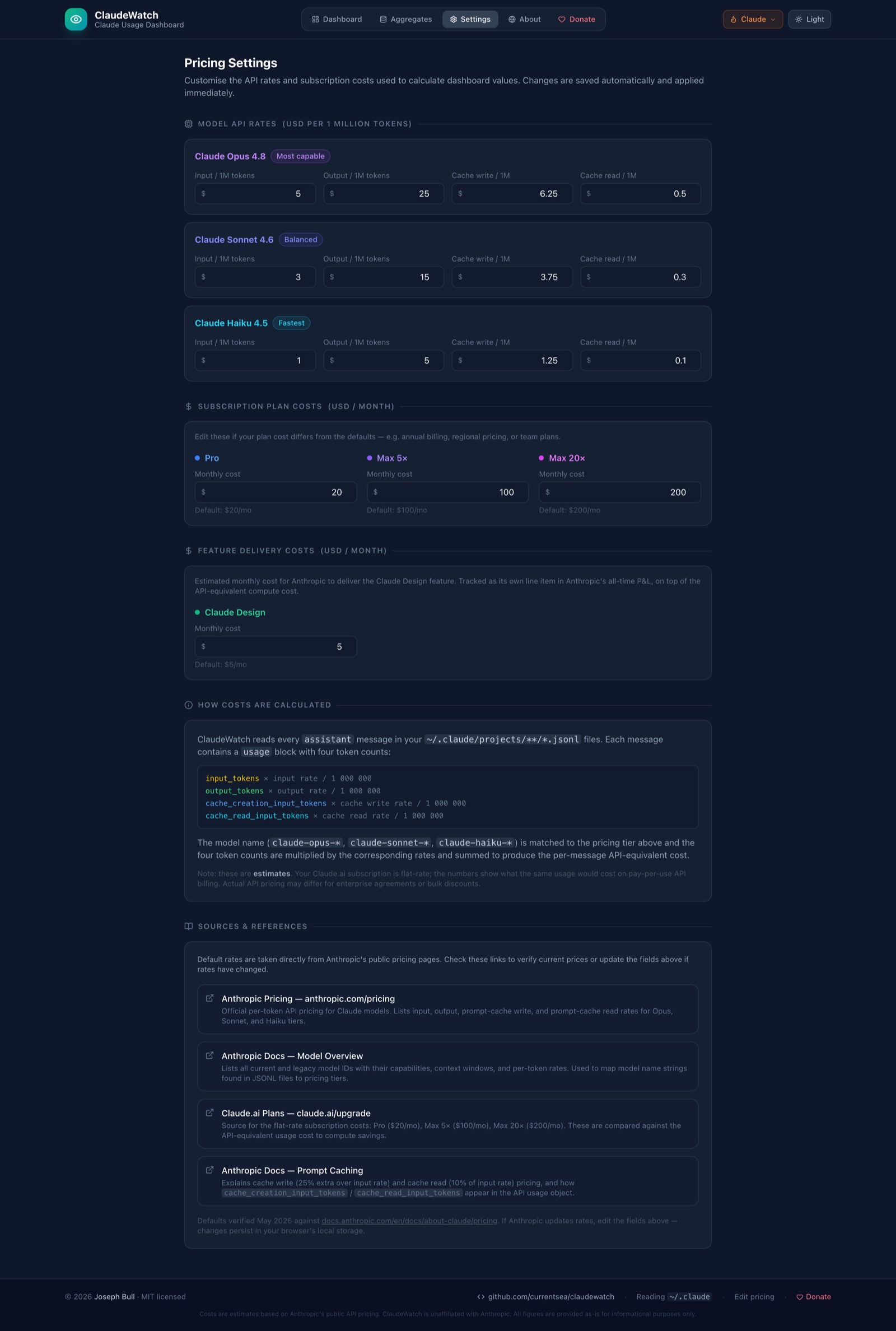
Default rates (USD per 1M tokens, verified May 2026). Every value is editable in Settings → Model API Rates.
| Model | Input | Output | 5m cache-write | Cache read |
|---|---|---|---|---|
| Claude Opus 4.5+ | $5 | $25 | $6.25 | $0.50 |
| Claude Sonnet 4.5+ | $3 | $15 | $3.75 | $0.30 |
| Claude Haiku 4.5 | $1 | $5 | $1.25 | $0.10 |
| Tier | Monthly | Plan |
|---|---|---|
| Pro | $20 | Claude.ai Pro (individual) |
| Max 5× | $100 | Claude.ai Max (5× usage) |
| Max 20× | $200 | Claude.ai Max (20× usage) |
Configuration
.env file.
Copy .env.example to .env and override any of the following. All
variables have sensible defaults — only set what you need to change.
| Variable | Default | Description |
|---|---|---|
CLAUDE_DATA_PATH | ~/.claude | Path to your Claude Code data directory. Only change if you moved it. |
SERVER_PORT | 3001 | Port for the Express API. If changed, also update proxy in package.json. |
BILLING_DAY | 30 | Day-of-month your Anthropic subscription renews (e.g. 15). |
CLAUDE_USAGE_WINDOW_HOURS | 5 | Length of Claude's rolling usage window, used for the active-sessions panel. |
REACT_APP_REFRESH_INTERVAL | 90 | Dashboard polling interval in seconds. Lower = more real-time (baked in at build time). |
Troubleshooting
The frontend is up but the backend isn't. Check whether it's running with lsof -i:3001, then start it on its own to see the logs:
npm run serverlsof -ti:3001 | xargs kill -9
npm startOr change SERVER_PORT in .env (and update package.json → proxy to match).
The backend can read ~/.claude but there's no usage data yet. Confirm the files exist, then send at least one Claude Code message and hit Refresh:
ls ~/.claude/projects/*/*.jsonl | head -5
claude --versionYour JSONL was produced by Opus 4.1 or earlier ($15/$75), but the defaults assume Opus 4.5+ ($5/$25). Open Settings → Opus and set input to 15, output to 75 — or hit ↺ to reset to defaults.
react-scripts errors)rm -rf node_modules package-lock.json
npm install
npm startStill seeing OpenSSL errors on Node 18+? Try NODE_OPTIONS=--openssl-legacy-provider npm start.
More edge cases and the full reference live in the project's README.
Grab the code
BurnItDown is MIT-licensed and not affiliated with Anthropic — the cost numbers are estimates derived from publicly published API rates. Clone it, run it locally, edit the rates, and see your own unit economics.